Trigger ETL Pipeline via REST API
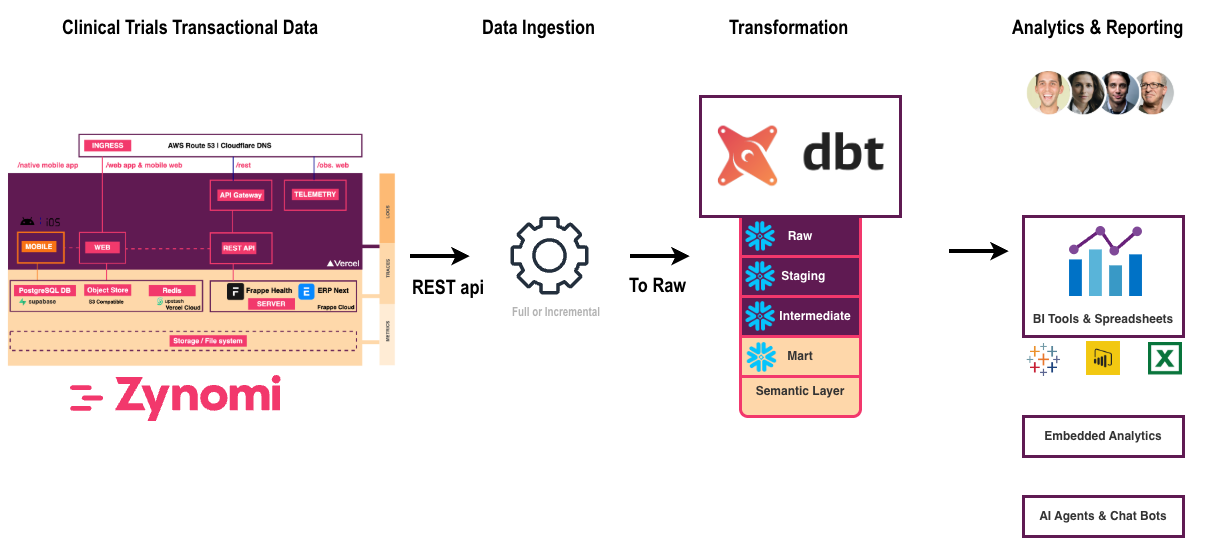
Zynexa exposes an async REST API to trigger ingester, dbt, and full pipeline runs without SSH access. Jobs run in the background — fire the trigger, get a jobId, and poll for status.
PIPELINE_ENABLED=truein.env.production- Lakehouse DB running (
docker compose --profile lakehouse up -d lakehouse-db)
See Pipeline Orchestration for all configuration variables.
Quick Start
# On the target server, use localhost (Zynexa listens on port 3000)
BASE=http://localhost:3000

# Or from a remote machine, use the server IP
# BASE=http://{IP_ADDRESS}:3000

# 1. Trigger full pipeline (ingester + dbt)
curl -s -X POST "$BASE/api/data-analytics/pipeline/trigger" \
  -H "Content-Type: application/json" \
  -d '{"pipeline": "full"}' | jq .

# 2. Poll for completion
curl -s "$BASE/api/data-analytics/pipeline/trigger?jobId=<jobId>" | jq .
SSH into the server and use http://localhost:3000 directly — no DNS or reverse proxy needed. This is the simplest way to verify the pipeline API is working.
Trigger Request
POST /api/data-analytics/pipeline/trigger
Request Body
| Field | Type | Required | Default | Description |
|---|---|---|---|---|
pipeline | string | Yes | — | "ingester", "dbt", or "full" |
command | string | No | "daily" | dbt command: "daily", "run", "build", "test", "deps", "elementary" |
enableOpenlineage | boolean | No | Server default | Override ENABLE_OPENLINEAGE for this run |
enableElementary | boolean | No | Server default | Override ENABLE_ELEMENTARY for this run |
Pipeline Types
| Type | What it runs | Typical duration |
|---|---|---|
ingester | DLT ingester → Bronze (~46 tables) | 2–5 min |
dbt | dbt deps → build → elementary | 5–15 min |
full | Ingester first, then dbt (sequential) | 10–20 min |
dbt Commands
| Command | What it does |
|---|---|
daily | dbt deps → dbt build → dbt run --select elementary (default) |
run | dbt run only (skip tests) |
build | dbt build (models + tests) |
test | dbt test only |
deps | dbt deps only (install packages) |
elementary | Elementary report generation only |
Response
The API returns immediately with HTTP 202 Accepted:
{
  "success": true,
  "output": "Pipeline \"dbt\" started in background.",
  "exitCode": -1,
  "jobId": "dbt-1710460800000-abc123",
  "status": "running"
}
Response Fields
| Field | Description |
|---|---|
success | true when the trigger was accepted, false when the API itself failed |
jobId | Unique ID for polling |
status | "running" → "completed" or "failed" |
exitCode | Container exit code (-1 while running, 0 = clean, non-zero = pipeline errors) |
output | Last 10 KB of container stdout+stderr |
success= whether the trigger command itself worked (container ran to completion)exitCode= pipeline-level result (missing tables, test failures → non-zero)
A job with status: "completed" and exitCode: 1 means the trigger worked but dbt had errors. Check logs for details.
Poll for Status
GET /api/data-analytics/pipeline/trigger?jobId=<jobId>
Completed Successfully
{
  "success": true,
  "exitCode": 0,
  "jobId": "dbt-1710460800000-abc123",
  "status": "completed",
  "output": "...Finished running 271 models, 197 tests...\nDone. PASS=271 WARN=5 ERROR=0..."
}
Completed with Pipeline Errors
{
  "success": true,
  "exitCode": 1,
  "jobId": "dbt-1710460800000-abc123",
  "status": "completed",
  "output": "...ERROR=5 (missing bronze tables)..."
}
List All Jobs
GET /api/data-analytics/pipeline/trigger
Returns all active and recently completed jobs (cleaned up after 1 hour).
Example Payloads
All examples use BASE=http://localhost:3000 (run from the target server). Replace with http://{IP_ADDRESS}:3000 for remote access.
Run Ingester Only
curl -s -X POST "$BASE/api/data-analytics/pipeline/trigger" \
  -H "Content-Type: application/json" \
  -d '{"pipeline": "ingester"}' | jq .
dbt Daily — All Features Enabled (Default)
Runs dbt with OpenLineage (Marquez lineage) and Elementary reports using server defaults:
curl -s -X POST "$BASE/api/data-analytics/pipeline/trigger" \
  -H "Content-Type: application/json" \
  -d '{
    "pipeline": "dbt",
    "command": "daily"
  }' | jq .
dbt Daily — Without OpenLineage (No Marquez)
Skip lineage emission — uses plain dbt instead of dbt-ol:
curl -s -X POST "$BASE/api/data-analytics/pipeline/trigger" \
  -H "Content-Type: application/json" \
  -d '{
    "pipeline": "dbt",
    "command": "daily",
    "enableOpenlineage": false
  }' | jq .
dbt Daily — Without Elementary
Skip the Elementary report generation step:
curl -s -X POST "$BASE/api/data-analytics/pipeline/trigger" \
  -H "Content-Type: application/json" \
  -d '{
    "pipeline": "dbt",
    "command": "daily",
    "enableElementary": false
  }' | jq .
dbt Daily — Minimal (No Marquez, No Elementary)
Fastest run — plain dbt build only, no lineage, no reports:
curl -s -X POST "$BASE/api/data-analytics/pipeline/trigger" \
  -H "Content-Type: application/json" \
  -d '{
    "pipeline": "dbt",
    "command": "daily",
    "enableOpenlineage": false,
    "enableElementary": false
  }' | jq .
dbt Daily — With OpenLineage, Without Elementary
Track lineage in Marquez but skip the Elementary report:
curl -s -X POST "$BASE/api/data-analytics/pipeline/trigger" \
  -H "Content-Type: application/json" \
  -d '{
    "pipeline": "dbt",
    "command": "daily",
    "enableOpenlineage": true,
    "enableElementary": false
  }' | jq .
Full Pipeline (Ingester → dbt)
curl -s -X POST "$BASE/api/data-analytics/pipeline/trigger" \
  -H "Content-Type: application/json" \
  -d '{"pipeline": "full", "command": "daily"}' | jq .
dbt Build Only (Models + Tests, No Elementary)
curl -s -X POST "$BASE/api/data-analytics/pipeline/trigger" \
  -H "Content-Type: application/json" \
  -d '{"pipeline": "dbt", "command": "build"}' | jq .
Poll Until Done (bash)
JOB_ID="dbt-1710460800000-abc123"

while true; do
  RESULT=$(curl -s "$BASE/api/data-analytics/pipeline/trigger?jobId=$JOB_ID")
  STATUS=$(echo "$RESULT" | jq -r '.status')
  echo "Status: $STATUS"

  if [[ "$STATUS" != "running" ]]; then
    echo "$RESULT" | jq .
    break
  fi
  sleep 10
done
Toggle Summary
| Payload | OpenLineage | Elementary | Use Case |
|---|---|---|---|
{} (defaults) | Server default | Server default | Normal daily run |
"enableOpenlineage": false | Off | Server default | Skip Marquez lineage |
"enableElementary": false | Server default | Off | Skip report generation |
Both false | Off | Off | Fastest — plain dbt only |
"enableOpenlineage": true, "enableElementary": false | On | Off | Lineage only, no report |
Error Responses
| HTTP Status | Meaning |
|---|---|
202 | Job accepted and running in background |
400 | Invalid pipeline type or dbt command |
403 | PIPELINE_ENABLED=false — pipeline API disabled |
404 | Job ID not found |
409 | Container already running (ingester or dbt) |
500 | Server error |