Platform Runbook
This is the authoritative command reference for operating the CTMS platform. All operational commands are documented here — other pages link back to this runbook for the canonical versions.
Throughout this page, DC refers to the canonical production compose command:
DC="docker compose -f docker-compose.yml -f docker-compose.prod.yml --env-file .env.production"
All commands assume you are in the /opt/ctms-deployment (or ctms.devops) directory.
Quick Reference
| Task | Command |
|---|---|
| Start core services | $DC up -d |
| Start all services | $DC --profile all up -d |
| Stop all services | docker compose --profile all down |
| View service status | docker compose --profile all ps |
| Health check | curl per service (see Health Checks) |
| View all logs | docker compose --profile all logs -f |
| Force-recreate all services | $DC up -d --force-recreate |
| Pull latest images | docker compose pull |
| Pull + restart (update) | ./zynctl.sh update |
| Seed demo users | ./zynctl.sh seed-users |
| Refresh Frappe token | ./zynctl.sh refresh-token |
| Fix server after snapshot | SERVER_HOST=<new-ip> ./zynctl.sh post-snapshot |
zynctl.sh Commands (Bundle Deployments)
If you deployed via zynctl.sh full-deploy, these shorthand commands are available:
| Command | Description |
|---|---|
./zynctl.sh status | Show running containers |
./zynctl.sh health | Check all service endpoints |
./zynctl.sh seed-users | Seed/re-seed demo users (idempotent) |
./zynctl.sh refresh-token | Re-generate Frappe API token + patch .env.production + recreate KrakenD |
./zynctl.sh logs [service] | View container logs |
./zynctl.sh stop | Stop all stacks (reverse order) |
./zynctl.sh restart | Restart CTMS core services |
./zynctl.sh update | Pull latest images + restart |
./zynctl.sh resume-deploy | Resume deployment from Step 7 (Supabase + Frappe already running) |
./zynctl.sh post-snapshot | Fix IPs, tokens, and ports after launching a server from an AMI/snapshot |
./zynctl.sh env-check | Validate .env.production for placeholders |
./zynctl.sh info | Show version, config, and system info |
./zynctl.sh destroy | Remove everything including data (irreversible) |
1. Service Management (ctms.devops)
Starting Services
| Task | Command |
|---|---|
| Core only (Caddy, KrakenD, Zynexa, Sublink, ODM) | $DC up -d |
| Core + Observability | $DC --profile core --profile observability up -d |
| Core + Analytics | $DC --profile core --profile analytics up -d |
| All services | $DC --profile all up -d |
Stopping & Restarting
| Task | Command |
|---|---|
| Stop all | docker compose --profile all down |
| Restart all (quick process bounce) | $DC restart |
| Force-recreate all (picks up env + image changes) | $DC up -d --force-recreate |
| Pull latest images + restart | ./zynctl.sh update |
| Update to new bundle version | Extract new bundle → SERVER_HOST=<ip> ./zynctl.sh deploy |
| Stop + remove volumes (destructive) | docker compose --profile all down -v --remove-orphans |
Instance-Specific Deployments
# Deploy for a specific instance
docker compose -f docker-compose.yml -f docker-compose.prod.yml \
  --env-file .env.<instance>.prod --profile all up -d

# Examples
docker compose -f docker-compose.yml -f docker-compose.prod.yml \
  --env-file .env.zynomi.prod --profile all up -d
Individual Service Management
restart vs up -d — Know the Differencedocker compose restart <service> only restarts the container process — it does NOT re-read .env.production or compose file changes. If you changed an environment variable (e.g., CUBEJS_DEV_MODE), you must use up -d to recreate the container with the new config:
# ❌ WRONG — env changes are NOT picked up
docker compose restart cube

# ✅ CORRECT — recreates container with latest env
docker compose -f docker-compose.yml -f docker-compose.prod.yml \
  --env-file .env.production up -d cube
Rule of thumb: Use restart only for a quick process bounce. Use up -d after any config change.
The canonical compose command for production (IP-based, before DNS) is:
DC="docker compose -f docker-compose.yml -f docker-compose.prod.yml --env-file .env.production"
| Task | Start / Recreate (picks up env changes) | Quick Restart (no env reload) |
|---|---|---|
| API Gateway | $DC up -d api-gateway | $DC restart api-gateway |
| Zynexa | $DC up -d zynexa | $DC restart zynexa |
| Sublink | $DC up -d sublink | $DC restart sublink |
| Caddy (reload config) | $DC exec caddy caddy reload --config /etc/caddy/Caddyfile | — |
| OpenObserve + OTEL | $DC --profile observability up -d openobserve otel-collector | $DC restart openobserve otel-collector |
| Cube.dev | $DC --profile analytics up -d cube | $DC restart cube |
| MCP Server | $DC up -d mcp-server | $DC restart mcp-server |
| ODM API | $DC up -d odm-api | $DC restart odm-api |
Common Scenarios
# Set the canonical compose command
DC="docker compose -f docker-compose.yml -f docker-compose.prod.yml --env-file .env.production"

# Scenario: Changed CUBEJS_DEV_MODE in .env.production
# Only 'cube' needs recreating — cubestore is unused when DEV_MODE=true
$DC --profile analytics up -d cube

# Scenario: Changed NEXTAUTH_SECRET or NEXTAUTH_URL
$DC up -d zynexa

# Scenario: Changed FRAPPE_API_TOKEN
$DC up -d zynexa mcp-server odm-api

# Scenario: Changed EC2_PUBLIC_IP (affects RUNTIME_* vars in prod overlay)
$DC --profile all up -d

# Scenario: Quick restart after OOM or crash (no config changes)
$DC restart zynexa
2. Logs
| Task | Command |
|---|---|
| All services | docker compose --profile all logs -f |
| Caddy | docker compose logs -f caddy |
| API Gateway | docker compose logs -f api-gateway |
| Zynexa | docker compose logs -f zynexa |
| Sublink | docker compose logs -f sublink |
| OpenObserve | docker compose logs -f openobserve |
| OTEL Collector | docker compose logs -f otel-collector |
| Cube.dev | docker compose logs -f cube |
Useful Log Filters
# Last 100 lines of a service
docker compose logs --tail 100 zynexa

# Logs since a specific time
docker compose logs --since 1h zynexa

# Logs for multiple services at once
docker compose logs -f zynexa api-gateway caddy
3. Shell Access
| Container | Command |
|---|---|
| Caddy | docker compose exec caddy sh |
| API Gateway | docker compose exec api-gateway sh |
| Zynexa | docker compose exec zynexa sh |
| Sublink | docker compose exec sublink sh |
| OpenObserve | docker compose exec openobserve sh |
| Cube.dev | docker compose exec cube sh |
4. Health Checks
Manual Health Checks
| Service | Command | Expected |
|---|---|---|
| Caddy | curl -s https://zynexa.localhost | 200 |
| API Gateway | curl -s https://api.localhost/__health | {"status":"ok"} |
| Zynexa | curl -s http://localhost:3000/api/health | 200 |
| Sublink | curl -s http://localhost:3001 | 200 |
| Cube.dev | curl -s http://localhost:4000/readyz | {"health":"HEALTH"} |
| OpenObserve | curl -s http://localhost:5080/healthz | 200 |
| ODM API | curl -s http://localhost:8000/health | 200 |
| MCP Server | curl -s http://localhost:8006/health | 200 |
| Grafana | curl -s http://localhost:3100/api/health | {"database":"ok"} |
| Elementary | curl -s http://localhost:3200/health | 200 |
Docker Health Status
# Check container health status
docker compose --profile all ps --format "table {{.Name}}\t{{.Status}}"

# Check a specific service
docker inspect --format='{{.State.Health.Status}}' ctms-zynexa
5. CTMS Init & Provisioning
| Task | Command |
|---|---|
| Run all 5 stages | docker compose --env-file .env.production --profile init up ctms-init |
| Force-pull before run | $DC --profile init pull ctms-init && $DC --profile init up ctms-init |
| Run specific stages | CTMS_INIT_STAGES=3,4 docker compose --env-file .env.production --profile init run --rm ctms-init |
| Dry run | CTMS_INIT_DRY_RUN=true docker compose --env-file .env.production --profile init run --rm ctms-init |
| Seed Supabase tables | docker compose --env-file .env.production --profile init run --rm ctms-supabase-seed |
Since ctms-init v1.11 (bundle v2.30), Stage 4 seeds "Laboratory" and "Drug" Item Groups before creating Items. This prevents 417 EXPECTATION FAILED errors when the ERPNext setup wizard didn't fully complete its fixture install. Total Stage 4 records: 142 (was 140).
For detailed stage descriptions, env variables, selective runs, and log analysis, see Platform Provisioning Commands.
Demo Data Seeding (Optional)
| Task | Command |
|---|---|
| Seed 4 demo users | ./zynctl.sh seed-users or $DC --profile init run --rm ctms-user-seed |
| Seed 20 synthetic patients | $DC --profile init run --rm ctms-patient-seed |
| Dry-run patient seed | DRY_RUN=true $DC --profile init run --rm ctms-patient-seed |
6. Data Lakehouse Pipeline
The data lakehouse pipeline extracts clinical data from Frappe, loads it into a dedicated PostgreSQL analytics database, and transforms it through medallion architecture layers using dbt.
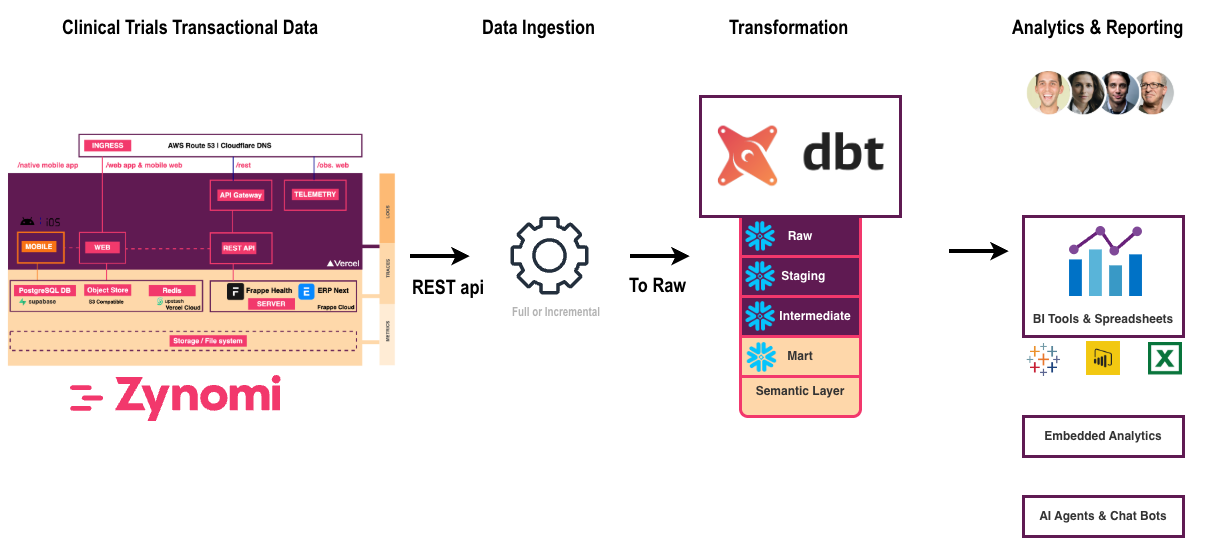
Frappe (REST API) → Ingester (DLT) → Lakehouse DB (PostgreSQL) ← dbt
                     Bronze layer     Bronze → Silver → Gold      197 tests
Before running the pipeline, ensure:
- Frappe is running and populated with clinical data (Studies, Sites, Subjects, Practitioners, etc.)
- Lakehouse DB is started and healthy
FRAPPE_API_TOKENandFRAPPE_URLare correctly set in.env.production
Without sample data in Frappe, the pipeline will produce empty tables and dashboards will have nothing to display.
Start Lakehouse DB
docker compose --env-file .env.production --profile lakehouse up -d lakehouse-db
Ingestion (Bronze Layer)
The ingester uses dlt (data load tool) to extract ~46 Frappe DocTypes via the REST API and load them into the bronze schema as raw tables.
# Run Ingester: Bronze (~46 tables)
docker compose --env-file .env.production --profile lakehouse run --rm lakehouse-ingester
dbt Transformation (Silver + Gold)
dbt transforms the raw bronze data through two additional layers:
| Layer | Schema | Tables | Purpose |
|---|---|---|---|
| Bronze | bronze | ~63 | Raw Frappe data (1:1 mirror of API responses) |
| Silver | silver | ~7 | Cleaned, deduplicated, joined clinical entities |
| Gold | gold | ~28 | Aggregated, analytics-ready tables for Cube.dev dashboards |
# Run dbt: Silver + Gold (bronze ~63, silver ~7, gold ~28 tables)
docker compose --env-file .env.production --profile lakehouse run --rm lakehouse-dbt daily
The daily command runs: dbt deps → dbt build → dbt run --select elementary.
Expected output: PASS=197 WARN=5 ERROR=0
Verify Table Counts
docker exec ctms-lakehouse-db psql -U ctms_user -d ctms_dlh -c "
SELECT schemaname AS schema, COUNT(*) AS tables
FROM pg_tables
WHERE schemaname IN ('bronze', 'silver', 'gold')
GROUP BY schemaname ORDER BY schemaname;
"
Full Refresh
Use when schema changes require rebuilding all models from scratch:
docker compose --env-file .env.production --profile lakehouse run --rm lakehouse-dbt dbt-full-refresh
Schedule with Cron
Automate daily pipeline runs (e.g., at 2 AM):
0 2 * * * cd /opt/ctms-deployment && \
  docker compose --env-file .env.production --profile lakehouse run --rm lakehouse-ingester && \
  docker compose --env-file .env.production --profile lakehouse run --rm lakehouse-dbt daily \
  >> /var/log/ctms-pipeline.log 2>&1
Purge Lakehouse Schemas (Reset)
This drops all pipeline data. Re-run the ingester + dbt after purging.
docker exec ctms-lakehouse-db psql -U ctms_user -d ctms_dlh -c "
DROP SCHEMA IF EXISTS raw CASCADE;
DROP SCHEMA IF EXISTS raw_staging CASCADE;
DROP SCHEMA IF EXISTS bronze CASCADE;
DROP SCHEMA IF EXISTS bronze_staging CASCADE;
DROP SCHEMA IF EXISTS silver CASCADE;
DROP SCHEMA IF EXISTS gold CASCADE;
"
Docker Commands Quick Reference
| Task | Command |
|---|---|
| Start Lakehouse DB | docker compose --env-file .env.production --profile lakehouse up -d lakehouse-db |
| Run ingestion (Bronze) | docker compose --env-file .env.production --profile lakehouse run --rm lakehouse-ingester |
| Run dbt daily | docker compose --env-file .env.production --profile lakehouse run --rm lakehouse-dbt daily |
| Run dbt full refresh | docker compose --env-file .env.production --profile lakehouse run --rm lakehouse-dbt dbt-full-refresh |
| Purge all schemas | See above |
| Restart Cube.dev cache | $DC --profile analytics restart cube |
For detailed configuration and troubleshooting of each stage, see:
7. Vendor Stacks (Self-Hosted)
Supabase
| Task | Command |
|---|---|
| Start | cd supabase && docker compose up -d |
| Stop | cd supabase && docker compose down |
| Status | cd supabase && docker compose ps |
| Logs | cd supabase && docker compose logs -f |
Frappe
| Task | Command |
|---|---|
| Start | cd frappe-marley-health && docker compose up -d |
| Stop | cd frappe-marley-health && docker compose down |
| Status | cd frappe-marley-health && docker compose ps |
| Get API token | docker logs frappe-marley-health-setup-1 2>&1 | grep FRAPPE_API_TOKEN |
| Regenerate API token | docker exec -w /home/frappe/frappe-bench frappe-marley-health-backend-1 bash -c 'source env/bin/activate && python3 /setup/frappe-generate-token.py' |
| Frappe shell (bench) | docker exec -it frappe-marley-health-backend-1 bash |
⚠️ After Restarting Frappe Services
Restarting the Frappe Docker stack (e.g., cd frappe-marley-health && docker compose restart or docker compose up -d) can cause the setup init container to re-run and regenerate the Administrator api_secret. The api_key remains unchanged, so it looks identical in the tabUser table — but the secret silently rotates, breaking all KrakenD → Frappe authentication with 401 AuthenticationError.
After every Frappe restart, run:
cd /opt/ctms-deployment
./zynctl.sh refresh-token
This single command will:
- ✅ Test the current token against Frappe
- 🔄 Regenerate if invalid (via the built-in helper script)
- 📝 Patch
.env.productionwith the new token - 🐳 Force-recreate the KrakenD API gateway container
- ✅ Verify both direct Frappe auth and the gateway
- 👉 Recipe: Fix Frappe API Token After Restart — detailed walkthrough
- Debugging & Troubleshooting → Frappe API returns 401 after restart — full root-cause analysis
Get the Frappe API Token
To retrieve the current token from the production environment file:
TOKEN=$(grep "^FRAPPE_API_TOKEN=" /opt/ctms-deployment/.env.production | cut -d= -f2)
echo "Token: ${TOKEN}"
This prints the full key:secret pair needed for Frappe API authentication. If empty, run ./zynctl.sh refresh-token to regenerate it.
8. Web Application (ctms-web)
Development
| Task | Command |
|---|---|
| Install dependencies | bun install |
| Start dev server | bun run dev |
| Build for production | bun run build |
| Start production server | bun run start |
| Lint code | bun run lint |
API Generation
| Task | Command |
|---|---|
| Generate entity APIs | bun run generate:apis |
| Generate OpenAPI spec | bun run openapi:generate |
| Validate OpenAPI spec | bun run openapi:validate |
| Export Postman collection | bun run openapi:postman |
9. Common Workflows
Full Platform Start (On-Prem)
cd ctms.devops

# 1. Start Supabase (creates ctms-network)
cd supabase && docker compose up -d && cd ..

# 2. Seed CTMS tables into Supabase
docker compose --env-file .env.local --profile init run --rm ctms-supabase-seed

# 3. Start Frappe (setup auto-completes wizard + generates API token)
cd frappe-marley-health && docker compose up -d && cd ..

# 4. Retrieve the generated API token → update .env.local
docker logs frappe-marley-health-setup-1 2>&1 | grep FRAPPE_API_TOKEN

# 5. Provision Frappe with CTMS data model (5 stages)
docker compose --env-file .env.local --profile init up ctms-init

# 6. Start CTMS core services
docker compose --env-file .env.local up -d

# 7. (Optional) Start analytics + observability
docker compose --env-file .env.local --profile all up -d
Daily Data Refresh
cd ctms.devops

# 1. Extract data from Frappe API → Lakehouse
docker compose --env-file .env.production --profile lakehouse run --rm lakehouse-ingester

# 2. Transform through dbt layers (Bronze → Silver → Gold)
docker compose --env-file .env.production --profile lakehouse run --rm lakehouse-dbt dbt-daily

# 3. Clear Cube.dev analytics cache
docker compose --env-file .env.production --profile analytics restart cube
Full Platform Stop (On-Prem, Reverse Order)
cd ctms.devops

# CTMS core
docker compose --profile all down

# Frappe
cd frappe-marley-health && docker compose down && cd ..

# Supabase (last — owns ctms-network)
cd supabase && docker compose down && cd ..
Clone Server from Snapshot
When launching a new server from an AWS AMI (or any disk-image snapshot), run:
SERVER_HOST=<new-server-ip> ./zynctl.sh post-snapshot
This fixes IP addresses, refreshes the Frappe API token, and force-recreates all services. See the full guide: Recipe: Post-Snapshot / AMI Setup.
10. URLs Reference
Core Services
| Service | URL |
|---|---|
| Zynexa | https://zynexa.localhost |
| Sublink | https://sublink.localhost |
| API Gateway | https://api.localhost |
| ODM API | https://odm.localhost |
Core + Observability
| Service | URL |
|---|---|
| OpenObserve | https://observe.localhost |
Core + Analytics
| Service | URL |
|---|---|
| Cube.dev Playground | https://cube.localhost |
| MCP Server | https://mcp.localhost |
| Grafana | http://localhost:3100 |
Core + Lakehouse
| Service | URL |
|---|---|
| Elementary Reports | http://localhost:3200 |
Vendor Stacks (Self-Hosted)
| Service | URL |
|---|---|
| Supabase Studio | http://localhost:8000 |
| Frappe Dashboard | http://localhost:8080/app |
11. Environment Files
| File | Purpose |
|---|---|
.env.example | Template (commit-safe, checked into Git) |
.env.production | Default production configuration |
.env.<instance>.prod | Instance-specific production (e.g., .env.zynomi.prod) |
.env.local | Local development (gitignored) |
12. GitHub Releases API
The CTMS bundle is distributed via GitHub Releases. These two API calls let you programmatically discover the latest version and download the bundle — useful for CI/CD pipelines, automated server provisioning, or upgrade scripts.
- Automated deployments: A CI/CD pipeline checks for the latest release, downloads the asset, and deploys.
- Upgrade scripts: Compare the running
VERSIONfile against the latest tag to decide whether to upgrade. - Air-gapped transfers: Download the bundle on a machine with internet, then SCP to a private server.
Discover the Latest Release
Returns the tag name, release title, and all downloadable assets (with their id for the next step).
GITHUB_TOKEN="<your-github-token>"

curl -sL \
  -H "Authorization: token $GITHUB_TOKEN" \
  -H "Accept: application/vnd.github.v3+json" \
  "https://api.github.com/repos/zynomilabs/ctms.devops/releases/latest" \
  | jq '{
    tag_name,
    name,
    assets: [.assets[] | {name, id, size, browser_download_url}]
  }'
Example response:
{
  "tag_name": "bundle-v2.31.20260308",
  "name": "CTMS Install Bundle v2.31.20260308",
  "assets": [
    {
      "name": "zynctl-bundle-2.31.20260308.tar.gz",
      "id": 369193224,
      "size": 71931,
      "browser_download_url": "https://github.com/zynomilabs/ctms.devops/releases/download/bundle-v2.31.20260308/zynctl-bundle-2.31.20260308.tar.gz"
    },
    {
      "name": "zynctl-bundle-2.31.20260308.tar.gz.sha256",
      "id": 369193223,
      "size": 101,
      "browser_download_url": "https://github.com/zynomilabs/ctms.devops/releases/download/bundle-v2.31.20260308/zynctl-bundle-2.31.20260308.tar.gz.sha256"
    }
  ]
}
Key fields:
tag_name— the version tag (e.g.bundle-v2.31.20260308)assets[].id— the asset ID needed to download the file via APIassets[].size— file size in bytes (useful for progress bars or integrity checks)
Download a Release Asset
Use the id from the previous response to download the bundle. The Accept: application/octet-stream header tells the GitHub API to return the raw binary.
GITHUB_TOKEN="<your-github-token>"
ASSET_ID=369193224  # from the 'id' field above

curl -sL \
  -H "Authorization: token $GITHUB_TOKEN" \
  -H "Accept: application/octet-stream" \
  "https://api.github.com/repos/zynomilabs/ctms.devops/releases/assets/$ASSET_ID" \
  -o /tmp/zynctl-bundle-latest.tar.gz

ls -lh /tmp/zynctl-bundle-latest.tar.gz
Full Example: Auto-Download Latest Bundle
Combine both calls to discover and download in one script:
#!/usr/bin/env bash
# Download the latest CTMS bundle from GitHub Releases
set -euo pipefail

GITHUB_TOKEN="<your-github-token>"
REPO="zynomilabs/ctms.devops"
OUT_DIR="/tmp"

# 1. Get latest release metadata
RELEASE=$(curl -sL \
  -H "Authorization: token $GITHUB_TOKEN" \
  -H "Accept: application/vnd.github.v3+json" \
  "https://api.github.com/repos/$REPO/releases/latest")

TAG=$(echo "$RELEASE" | jq -r '.tag_name')
ASSET_ID=$(echo "$RELEASE" | jq -r '.assets[] | select(.name | endswith(".tar.gz") and (endswith(".sha256") | not)) | .id')
ASSET_NAME=$(echo "$RELEASE" | jq -r '.assets[] | select(.name | endswith(".tar.gz") and (endswith(".sha256") | not)) | .name')

echo "Latest release: $TAG"
echo "Asset: $ASSET_NAME (ID: $ASSET_ID)"

# 2. Download the bundle
curl -sL \
  -H "Authorization: token $GITHUB_TOKEN" \
  -H "Accept: application/octet-stream" \
  "https://api.github.com/repos/$REPO/releases/assets/$ASSET_ID" \
  -o "$OUT_DIR/$ASSET_NAME"

echo "Downloaded: $OUT_DIR/$ASSET_NAME ($(du -h "$OUT_DIR/$ASSET_NAME" | cut -f1))"
The GitHub API requires a Personal Access Token with repo scope for private repositories. For public repos, the token is optional but avoids rate limits (60 req/hr unauthenticated vs 5,000 req/hr authenticated).